Category: English

Using Hermes with local AI – what can you do with it?

You may wonder, is LocalAI good enough? Do we understand it? Can it be used to do something good?

Short answer: Yes.

First of all, how it does look like?

In the video below you can see how it looks like form my home setup. A workstation, with a GTX 3090, 24 Gb of VRAM, and 64 Gb of RAM. Running a local Qwen 3.6 (dense), via Hermes agent.

So this is the setup, from an hardware point of view, but you need more.

What do you need to make it work

On top of some hardware where to make it run (I read that some folks managed to run small model on 8 Gb or less), I can testify it works on 24 GB of RAM.

Then, the next important bit: how to interact with the agent.

You need to give your agent a dedicated identity. I’m not talking about the SOUL.md and other stuff like that, I’m talking about permission. The great analogy here is that you are getting a new “collegue” which will need its own email, github username and so forth. This is the bit that makes it working.

Then, you need to know how to delegate. This is extremely important. If you give not clear direction, on what is the task, what are the goals, what success looks like and how do we measure it gets really hard.

You need to give the ability to assess if the results is good.

What can you do with it?

You can do lots of things.

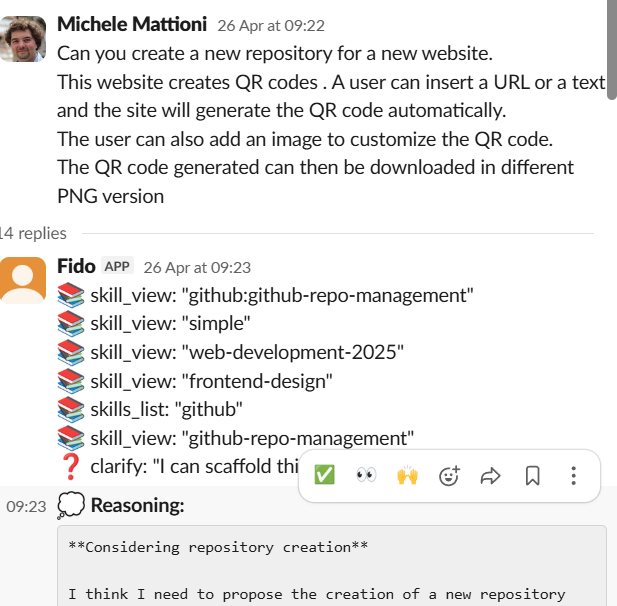
1. Completely new web application from scratch for QR codes

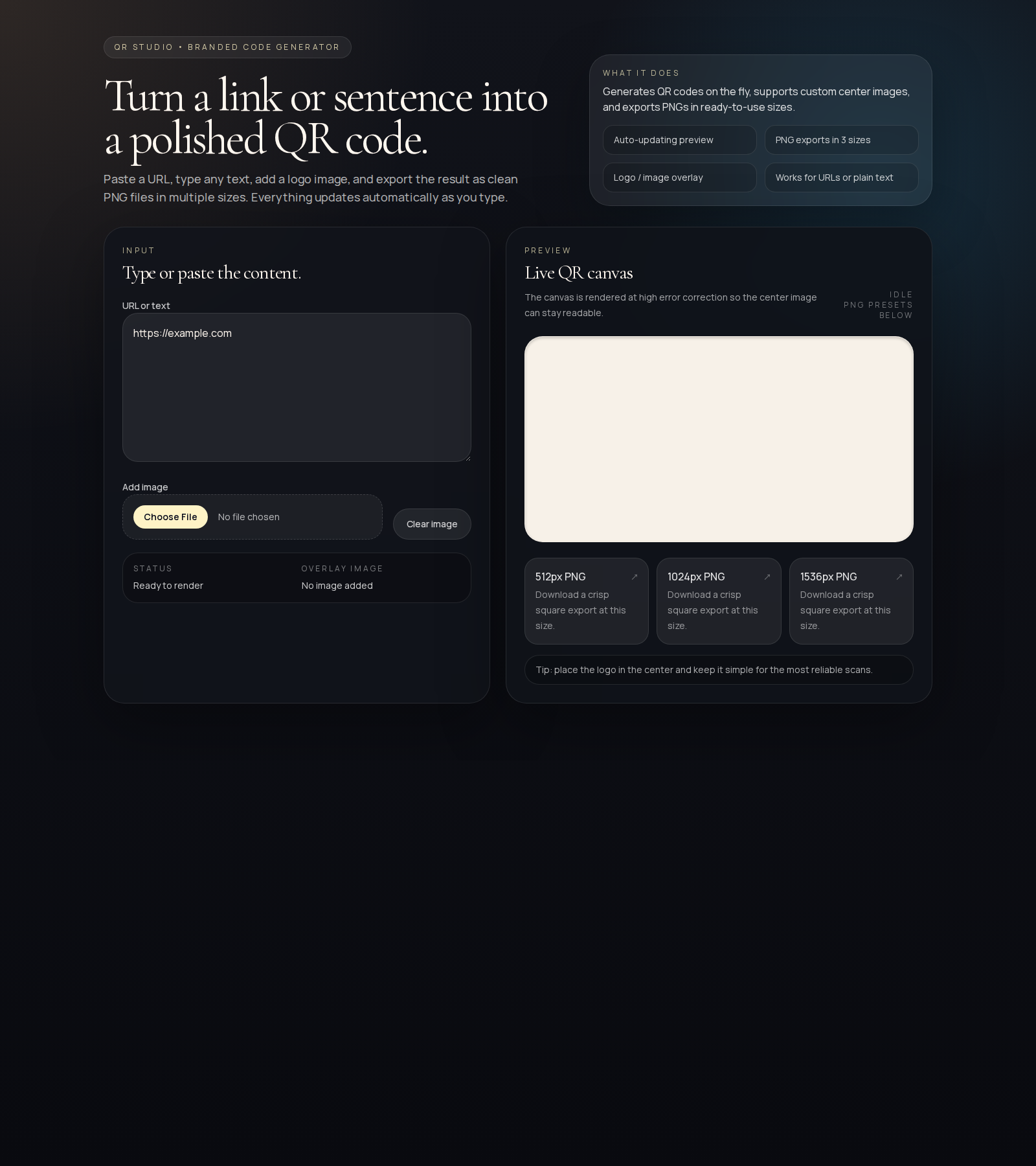
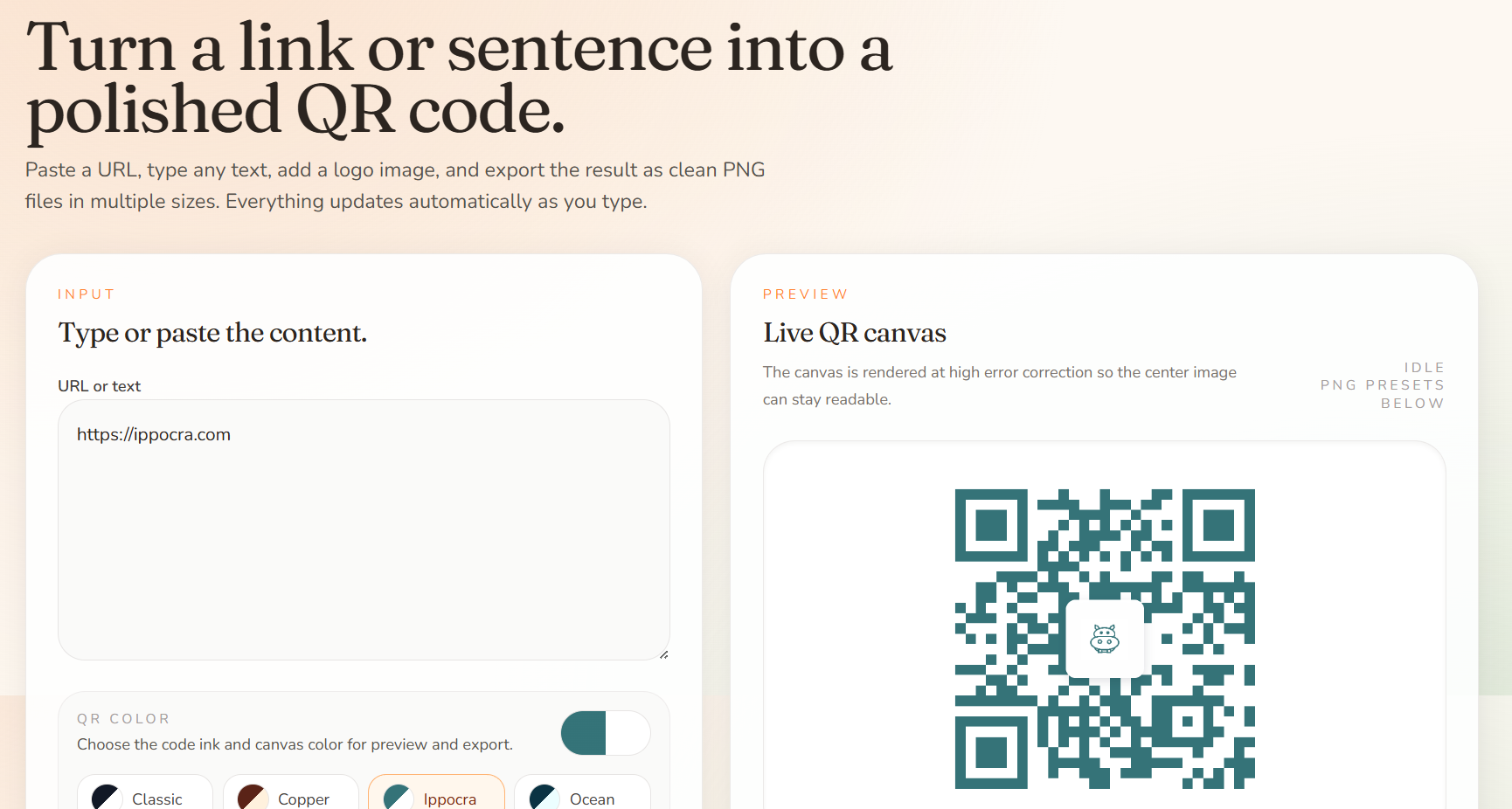
Qrcode application. I’ve created from scratch a QRcode application that is now hosted at https://qrcode.ippocra.com .

    How this has been put together? With this simple message:
    This is the first version
    With a little bit of help and direction, this is the final version
    2. Create instagram carousel for Ippocra

    With Ippocra (https://ippocra.com) I wanted to see if we could create content for the Company instagram account.

    This is the first attempt:
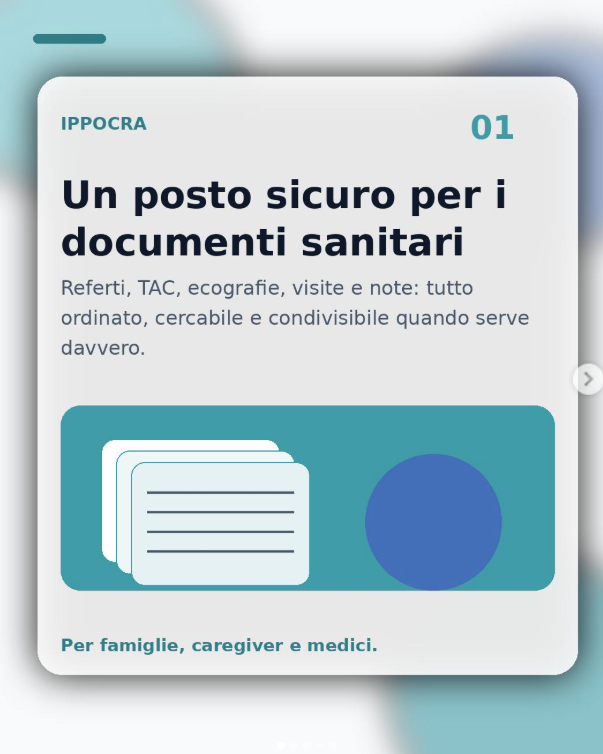
    https://www.instagram.com/p/DXZE19bDPHG/

    My second attempt was this one:

    Here is the full carousel:

    https://www.instagram.com/p/DXeMNlqjKwL

    It took some new skills, a dedicated brand page on ippocra, and some work, but I’ve managed to get something like that working.

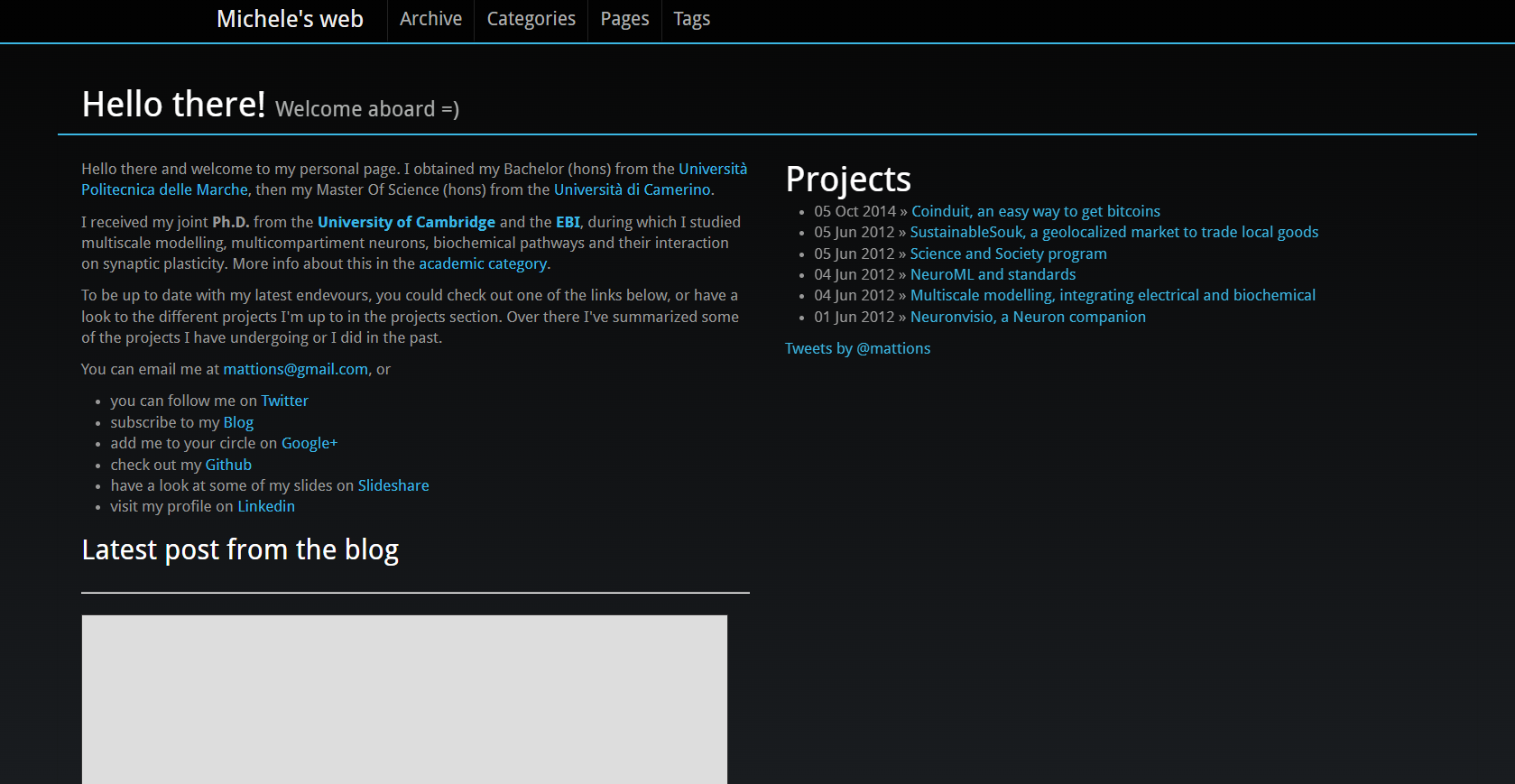
    3. Rework my old personal website

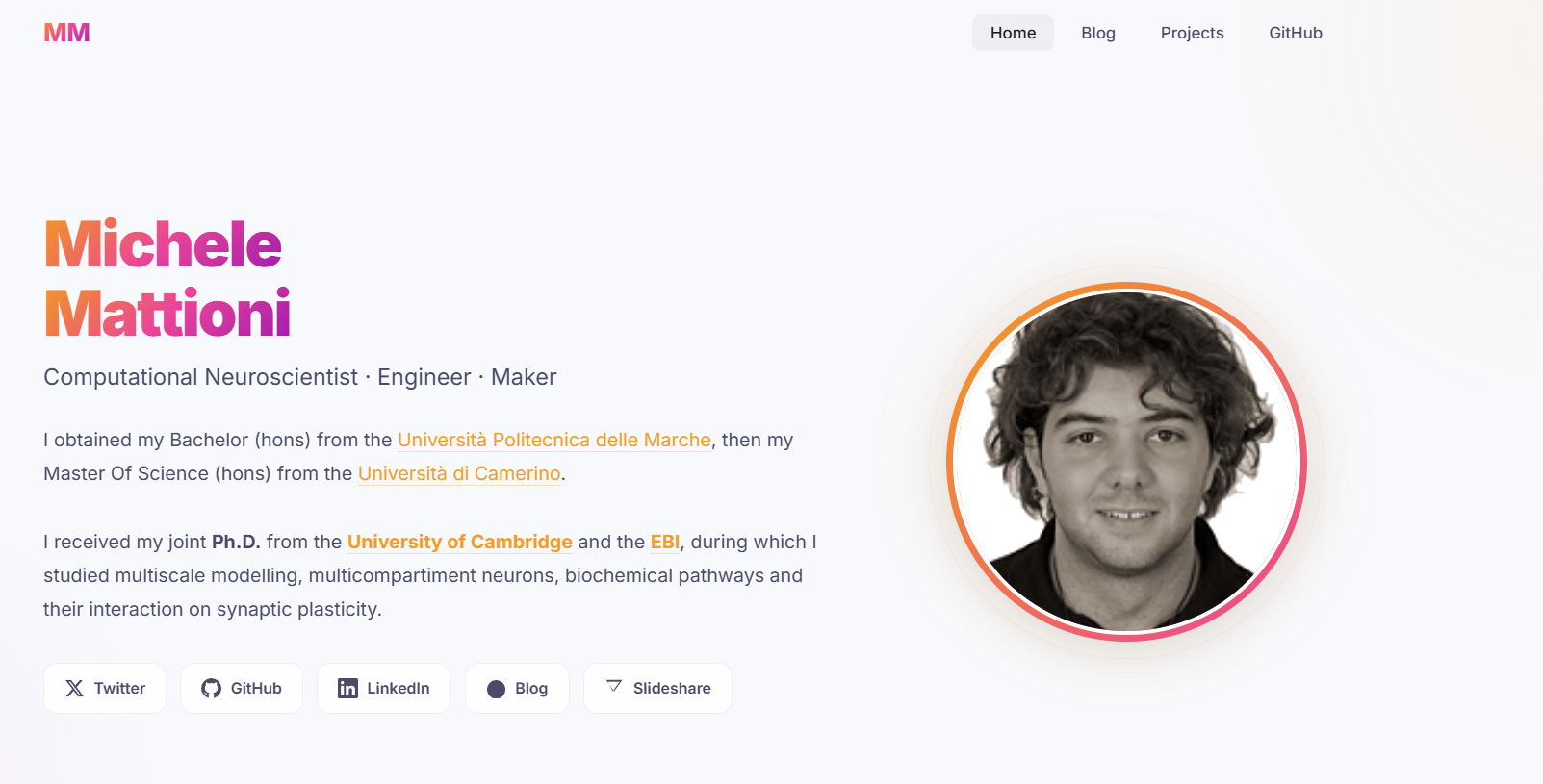
    I wanted to refresh my old personal website, given that the connection with the blog post and then one with twitter were broken. So I’ve asked my local Agent to help.

    As you can see form this series of github PR:

    1. PR2 — did not like it: https://github.com/mattions/mattions.github.com/pull/2
    2. PR3 — a bit better, but not exactly what I was looking for: https://github.com/mattions/mattions.github.com/pull/3
    3. PR4 — now we are talking: https://github.com/mattions/mattions.github.com/pull/4

    All this PR were created by hermes, using the local AI.

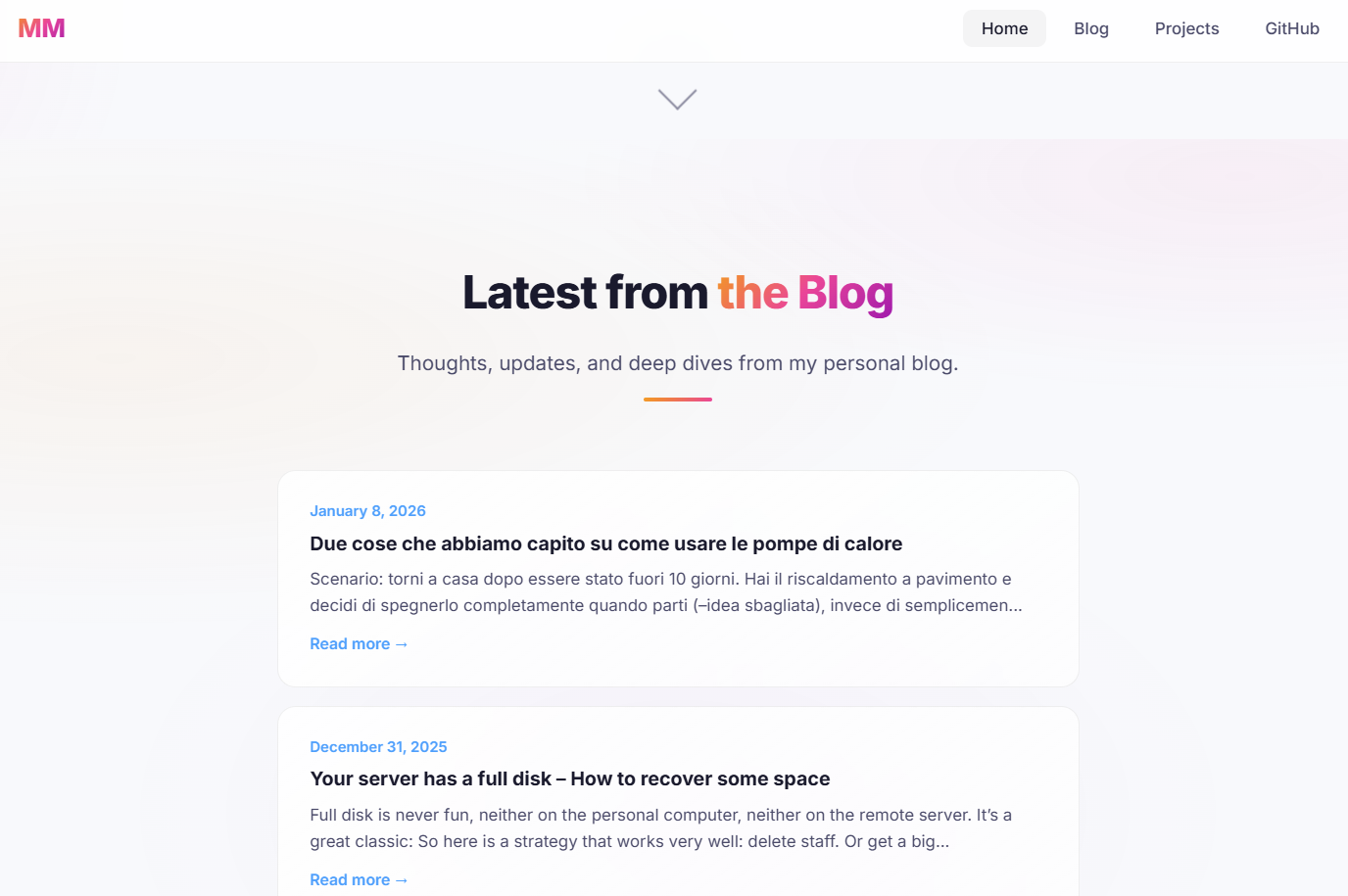
    So we went from this:
    to this:
    4. Energy management solution for solar panel + EV charging

    I’ve got at home a solar panel installation and I’ve got an electric car.

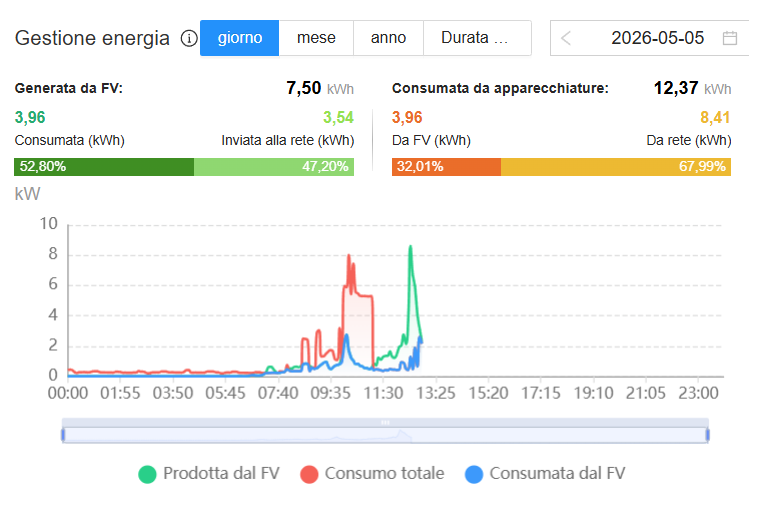
    My solar panel are able to output something like 7/8 kWh of power and the car can be tuned to absorbe 3/4/5 or more kWH.

    The goal here is to make sure that what gets produced should first get used by the load of the house, and then the car.

    Quick snapshot: instant production 2025/05/05
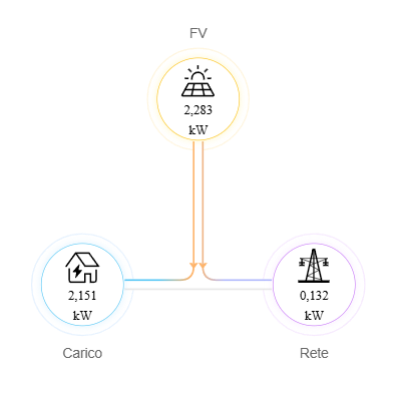
    Today’s production graph
    Yesterday’s production graph:
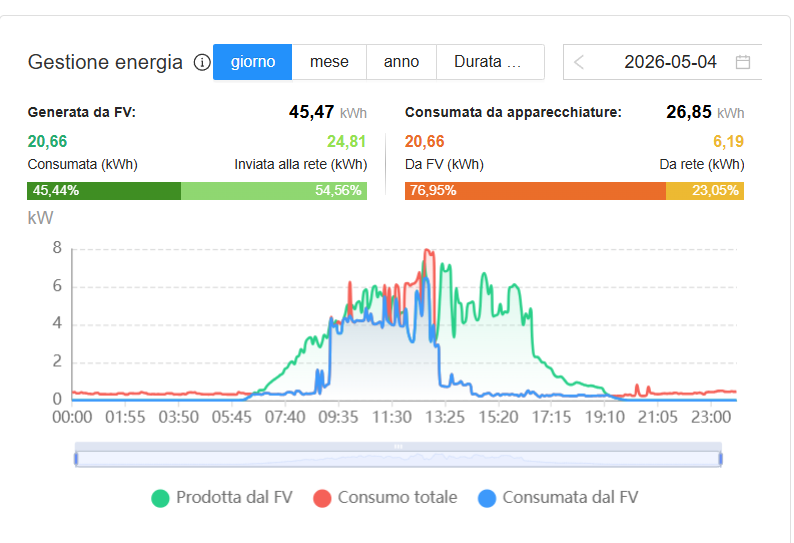
    As you can see, the blue block is when the car is re-charging during the solar power generation, which however it depends a lot on the weather condition (more or less cloudy, more or less usage from the house).

    This type of technology exists if you have the battery from the same brand. I’ve got a Huawei solar inverter and a Tesla Wall Charger with a Model 3, so I need to build my own.

    I’ve got my local Hermes working on this, and, while it’s a work in progress, we already have the first part to read the power from the modebus.

    Conclusion

    I have some more example (sending emails, creating an application to track expenses, rework Ippocra marketing website) and so forth.

    LocalAI is here and can work very well with the delegation approach. Give it a go.

    Till next time.

    Have fun!
    Your server has a full disk – How to recover some space

    Full disk is never fun, neither on the personal computer, neither on the remote server. It’s a great classic:

    • you want to install a new game, or you need a new docker image, but your harddrive is full. What do you do?
    • your server does not respond anymore. You check the stats: hard-drive is full, and you can’t do anything (it’s really hard just to login). What do you do?

    So here is a strategy that works very well: delete staff. Or get a bigger disk. As the latin say tertium non datur

    One great way to save space is to offload some of the documents somewhere else.

    For example I have data in google cloud, and I actually pay the service for having additional space to save my files.

    For my medical records, and the one of my family, I actually use https://ippocra.com/, which, on top of providing encrypting data, and auto-categorization per type and per person for the documents, has the smart search, which is a saviour.

    In particular, I know my stuff is there and I do not need to worry anymore.

    Small caveat: I’ve built Ippocra, because there was nothing even close to that.

    How to delete files from the console in linux

    So the first thing to do is to understand where we start: df gives you a good idea where you stand.

    mattions@ares:~$ df -h
    Filesystem      Size  Used Avail Use% Mounted on
    tmpfs           1.6G  2.8M  1.6G   1% /run
    /dev/nvme0n1p2  468G  255G  190G  58% /
    tmpfs           7.7G  513M  7.2G   7% /dev/shm
    tmpfs           5.0M  8.0K  5.0M   1% /run/lock
    efivarfs        246K   60K  182K  25% /sys/firmware/efi/efivars
    /dev/nvme0n1p1  1.1G  6.3M  1.1G   1% /boot/efi
    tmpfs           1.6G  132K  1.6G   1% /run/user/1000
    

    Now that you have an idea, you’ve got to find the big files:

    find . -size +1000M -ls

    After you find them, you can delete them. Or offload them somewhere else, or buy a new disk.

    P.S.: I suggest also to look into du as command, that can give you an idea of how much space for each directory.

    Let me take also a moment to say Happy New Year to everyone!

    How to update angular the right way

    While working on ippocra.com, I’ve found myself in a bit of a predicament when I was trying to update angular (which they release a new version every 6 months, so it’s kind of something you’ve got to do).
    I’ve figured out that the classic command that is written everywhere it may works for folks that have a set of dependencies that are pretty standard:

    ng update @angular/core@20 @angular/cli@20

    That will update form angular 19 to 20. Which is fine. But it may breaqk if you use other dependencies like ngrx .

    So here is the thing to update also these in one go:

    ng update @angular/core@20 @angular/cli@20 @ngrx/store@latest

    That will update everything you need in one go.

    If you have a problem with a dependencies, you need to pass it to that command.

    Hope it helps.

    and now Ippocra

    E ora Ippocra! I always had the idea to build something like Ippocra, a way to manage your own health records in a way that is easy, secure and simple.

    This starts from long time ago. I still remember the first attempt, called myhealthserver which we built in an Hackathon in Cambridge long long time ago (more than 20 years). It was me, Matias (hi there :D) and joined us on the day an MD that was interested in that. It was a two days Hackathon, and we had quite a lot of fun.

    After that I did not continue on the same path, but I focused on finishing my joint PhD at the University of Cambridge and EBI. I’ve written quite a lot of software, from 3d neurons visualizer, to algorithms to model the connect biochemical and electrical systems, while fostering a culture of open-source, and tracking code in version control (Git was just invented, and I was showcasing it to my pre-docs community and tried to convince them to adopt it, with a decent rate of success).

    Finished the PhD I decided to launch my first startup, SustainableSouk, an en-devour focused on making local food easier to find and order. This was way back, in 2012, when this idea was still super early. I was part of the Transition Cambridge movement and we tried to look at that for a bit. We realized pretty soon that we needed lots of stamps and authorization, treating food and beverage, making the whole enterprise too expensive to launch, and we decided to stop it. Also I did not want to end up managing lots of physical goods, so I switched.

    After that I went working for DVLTech, where we start to build Darktrace. I was the one creating the Math Team, and leading it as Head of Math (Hi Tom, Steve, Damian and Valerio!), and I built a whole team from scratch, focused on detecting network anomalies. It was very fun and very challenging, but we had a phenomenal time. I also set up the local basketball Wednesday play, which we used to play in our lunch break, with a phenomenal uptake. I still have a basketball signed by all my former colleagues. As a side hustle I worked on Conduit (Hi Daniel!), which become the second biggest bitcoin exchange in UK for a while.

    The love for biology/genomics call me back again though, and I start to collaborate with Sofia Genetics (Hi Tamara!) to build MOKA, a software made on coffee (and not, it’s not an acronym eheh, where we had 3 patents) and which is still used by Sofia Genetics AFAIK.

    Then my Seven Bridges years started, where I joined the London office very early on (hi Julia!) and we started to establish the foot print of Seven Bridges in UK and Europe (which at the time was still in the European Union). Lots of fun, proposing the platform to customers to have an easier, faster and reproducible way to do complex research. I’ve soon started to work with the Children Hospital of Philadelphia and the Cavatica platform (Hi Allison and Adam!). This was a phenomenal partnership, where we managed to push the boundaries of possibility, making it the best platform in the world to do research, while making sure that the whole field was advancing with us. Lots of colleagues who I shared really good time at SBG, starting with the folks in my team (hi Surya and Jared), the whole Program team, and the folks in Belgrade office.

    This is way I’ve focused very early on on the standards, making sure we had open-standards that were possible to adopt by anyone, in a fast and easy way, and most importantly, they were solving a problem that people had.

    This was done under the GA4GH umbrella (Hi Brian, Heidi, Ian, Kurt, David and all the GA4GH Community), where we have invented DRS, Passport, how to connect them, and how to connect these to FHIR. I called this strategy the interoperability triangle, and it was pretty well accepted both at Seven Bridges and also outside (It was adopted by the NIH, and it was also reported in the congressional papers in the senate of the United States of America.)

    And now it’s time of Ippocra! A new adventure that just started, but already is giving us very good vibes and we are seeing real interest and validation.

    Stay tuned for more!

    6 Nations 2025 calendar file – get it here

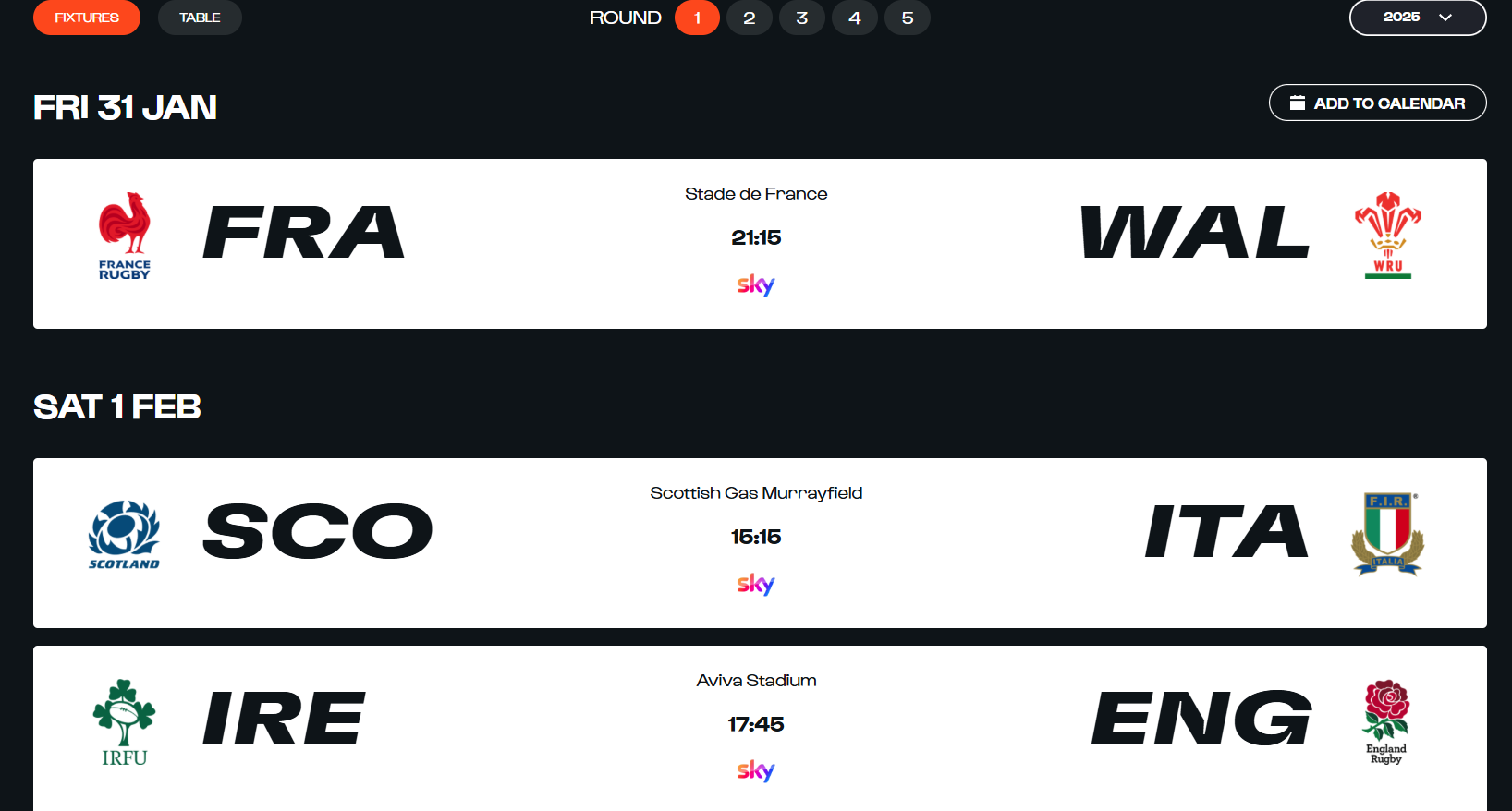
    I was looking for a 6 Nations 2025 calendar in the `ics` format, so I could add it to my own google calendar, to have an idea who was playing and what time.

    Do you want a calendar file? Give me all your information

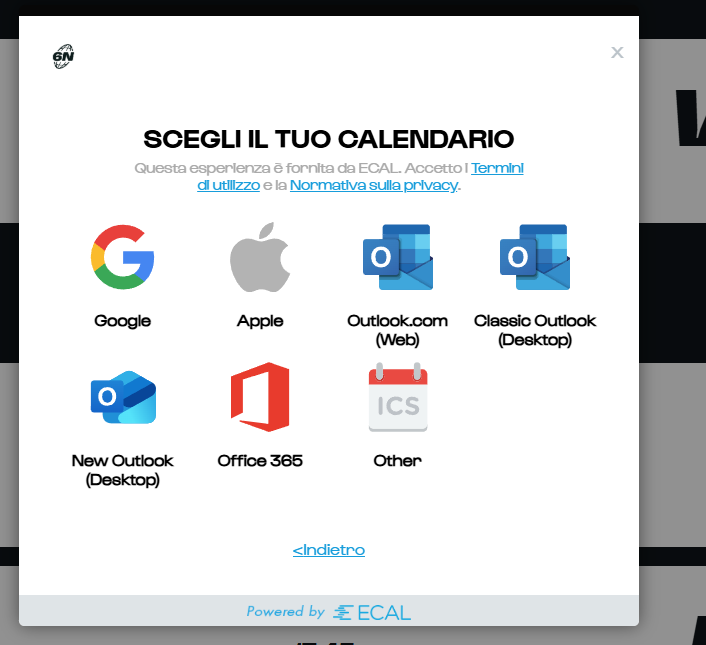
    I was taken extremely disgusted by the approach taken by the folks at https://www.sixnationsrugby.com/en/m6n/fixtures/2025, who, when you try to add a calendar, instead of just giving you the file, ask you to provide access to all your google calendars (or equivalent) via the Ecal website.

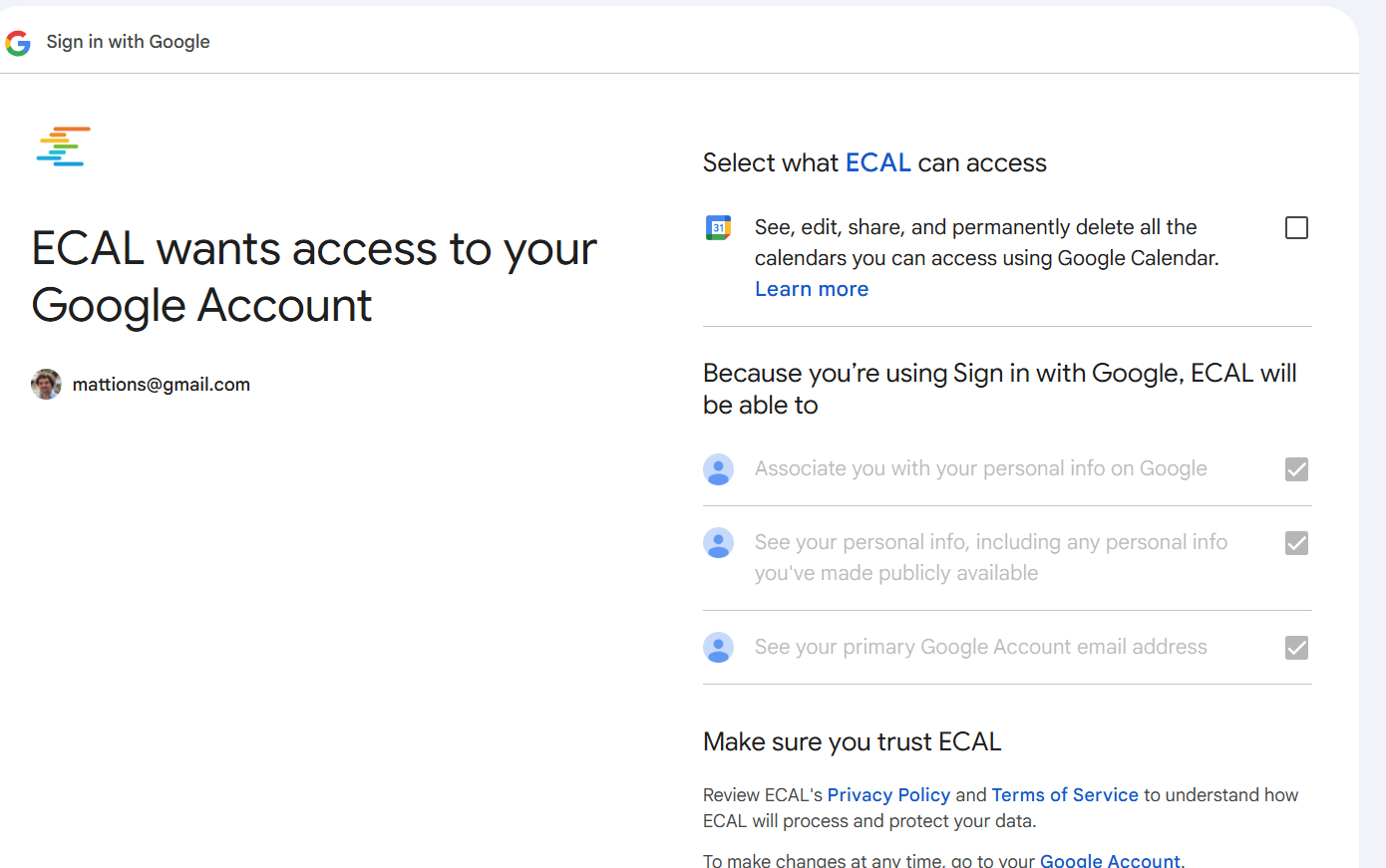
    The permissions required are way too broad for such type of request, and it makes no sense.

    This is what you see when you try to add the calendar:

    Picking google this is what you see:

    To track some rugby matches, that are happening between Jan and March, this wants to have a constant access to all my calendars!

    The only decent answer is no thank you.

    Given the information are available, on when the matches are happening, written in several website, I took that info, I given to an AI and I had that generated the ics for me.

    You can find it below. Simply import it in your calendar and should be good.
    As usual, Forza Azzurri 😀

    HTH!

    Lifting a blind roller in a DIY approach — just a planning post

    The Problem: I have two massive blind rollers that are operated by hand. I would like to explore the possibility to lift them using a combination of electric motors and gears.

    The main idea is to figure out how to achieve that with very small motors, and have a system that would work not too slowly to be completely useless.

    Following the information provided in this post, the problem can be decomposed into two:

    1. The torque of the model. With the right gearboxes also a small motor could lift (slowly) a heavy weight, so that is something that needs to be explored
    2. The rate of which the motor can lift the weight.

    While the first one is difficult to calculate, the main idea for the second can be calculated using the following formula:

    \[ W= m g h \over t \]

    Where W is the power required to lift a mass m of an height h in a time t.
    It’s also possible to rewrite as the velocity v on which such mass gets lifted (because v = h/t):

    \[ W = mgv \]

    So if we use 10Kg as weight, to lift this at a speed of 1 m/s would require a power:

    \[ W = 10 \times 9.81 \times 1 = 98.1W \]

    This is just the beginning of the rabbit hole. I may post updates in the future if I will continue this. We will see.

    Fun with Pyscript

    Update: you can have only one py-script block for now. I removed the example one, and just left matplotlib example.

    Pyscrypt has just been released and I feel I had to give it a go straight up from my blog.

    The usage seems to be pretty straightforward:

    • you drop the link to the pyscrip.js in the HTML, and then you have the new <py-script> tag where you can write Python. Standard Python.
      For example the code below actually gets transformed into a string with the content Now you can!
    <pre>
    <link rel="stylesheet" href="https://pyscript.net/alpha/pyscript.css" />
    <script defer src="https://pyscript.net/alpha/pyscript.js"></script>
    
    <div id="target"></div>
    <py-script output="target"> 
    from datetime import datetime
    now = datetime.now()
    
    </py-script>
    </pre>

    which produce the following result!


    from datetime import datetime now = datetime.now() #print("What time is it?") #print("Computed directly from Python: " + now.strftime("%m/%d/%Y, %H:%M:%S")) #print("Now you can use Python within the browser natively!")

    Interestingly, you have the full Python arsenal at your disposal.

    This code creates a matplotlib plot:

    <pre>
    <link rel="stylesheet" href="https://pyscript.net/alpha/pyscript.css">
    <script defer src="https://pyscript.net/alpha/pyscript.js"></script>
    <py-config>
          packages = ["matplotlib", "numpy"]
    </py-config>
    <div id="mpl"></div>
    <py-script output="mpl">
    import matplotlib.pyplot as plt
    import matplotlib.tri as tri
    import numpy as np
    
    # First create the x and y coordinates of the points.
    n_angles = 36
    n_radii = 8
    min_radius = 0.25
    radii = np.linspace(min_radius, 0.95, n_radii)
    
    angles = np.linspace(0, 2 * np.pi, n_angles, endpoint=False)
    angles = np.repeat(angles[..., np.newaxis], n_radii, axis=1)
    angles[:, 1::2] += np.pi / n_angles
    
    x = (radii * np.cos(angles)).flatten()
    y = (radii * np.sin(angles)).flatten()
    z = (np.cos(radii) * np.cos(3 * angles)).flatten()
    
    # Create the Triangulation; no triangles so Delaunay triangulation created.
    triang = tri.Triangulation(x, y)
    
    # Mask off unwanted triangles.
    triang.set_mask(np.hypot(x[triang.triangles].mean(axis=1),
                             y[triang.triangles].mean(axis=1))
                    < min_radius)
    
    fig1, ax1 = plt.subplots()
    ax1.set_aspect('equal')
    tpc = ax1.tripcolor(triang, z, shading='flat')
    fig1.colorbar(tpc)
    ax1.set_title('tripcolor of Delaunay triangulation, flat shading')
    
    fig1
    </py-script>
    </pre>


          packages = ["matplotlib", "numpy"]
    
    
    import matplotlib.pyplot as plt import matplotlib.tri as tri import numpy as np # First create the x and y coordinates of the points. n_angles = 36 n_radii = 8 min_radius = 0.25 radii = np.linspace(min_radius, 0.95, n_radii) angles = np.linspace(0, 2 * np.pi, n_angles, endpoint=False) angles = np.repeat(angles[..., np.newaxis], n_radii, axis=1) angles[:, 1::2] += np.pi / n_angles x = (radii * np.cos(angles)).flatten() y = (radii * np.sin(angles)).flatten() z = (np.cos(radii) * np.cos(3 * angles)).flatten() # Create the Triangulation; no triangles so Delaunay triangulation created. triang = tri.Triangulation(x, y) # Mask off unwanted triangles. triang.set_mask(np.hypot(x[triang.triangles].mean(axis=1), y[triang.triangles].mean(axis=1)) < min_radius) fig1, ax1 = plt.subplots() ax1.set_aspect('equal') tpc = ax1.tripcolor(triang, z, shading='flat') fig1.colorbar(tpc) ax1.set_title('tripcolor of Delaunay triangulation, flat shading') display(fig1, target="graph-area", append=False)

    Note: If you are trying to use the <py-script></py-script> on wordpress, using a Custom element block, you need to wrap the code with <pre></pre> otherwise wordpress will texturize the text, changing the characters to some more pleasing to the eye. However the HTML is actually executed by the py-script and it will not understand this link.

    How to connect externally from a WSL (Ubuntu) running on a windows 10

    I had to move to a Windows 10 computer for work, and even if I’m not working a lot on code and so forth, I need sometime to create an ipython notebook or try to launch some code I’ve got from github.

    Having the ability to install the ubuntu distribution via the WSL2, directly form the Microsoft Store is a great help. The ability to use Visual Studio which connects to these “magic” area of the filesystem makes also the editing nice and easy.

    Usually I like to go with the console, and I’m using the Windows Terminal, which is able to launch several environments in a native way.

    However there is a little snag: you cannot contact the outside world or the internet, because by default the Windows firewall says no.

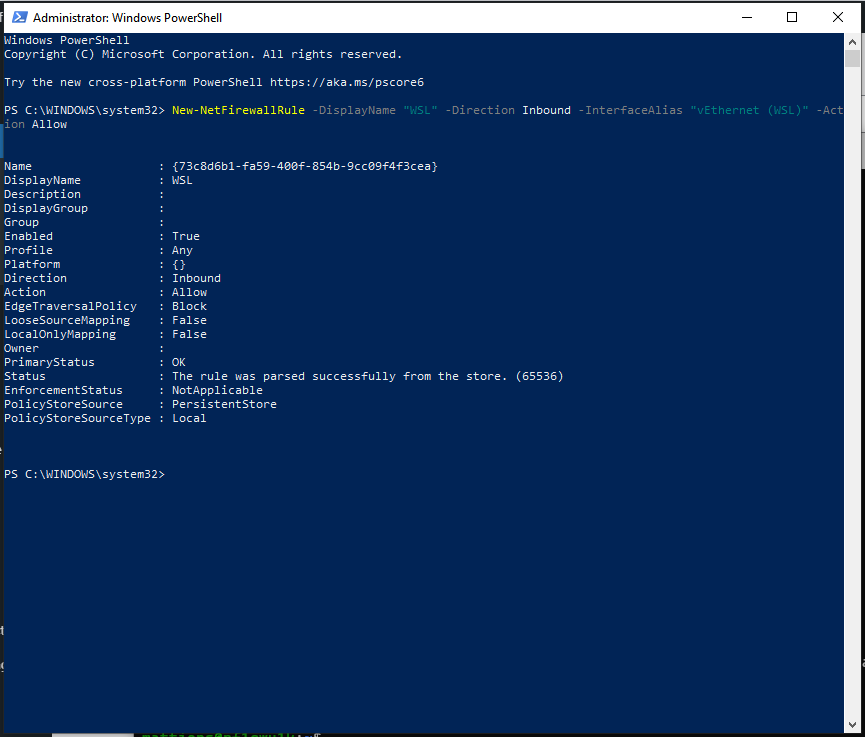
    It’s easy to fix, thogh: Open the PowerShell as Administrator and launch:

    `New-NetFirewallRule -DisplayName “WSL” -Direction Inbound -InterfaceAlias “vEthernet (WSL)” -Action Allow`

    as shown below

    Power Shell running as Admin

    After that, you are golden. Unfortunately, for me, I have to re-run that every time I re-boot or come back from a Suspend. I would be very interesting to know if someone figure out how to do it in a permanent way.

    Get the OEM key from your windows 10

    So I’ve got this new computer with Windows 10 because Baldurs Gate 3 is coming out, and I did not have a tower for quite long time. The windows has been installed by the people where I’ve got it, and there is a second partition where I will install ubuntu. Unfortunately on the first go it did not work due to the NVIDIA card inside, (just a GTX 1060, not the new 30 series that everyone is going crazy about it), but the net has already a solution for it, which I will give it a try ASAP I’ve got time.

    At the same time I’ve used it to play Heroes of the Storm and I’ve also tried my first stream on twich.tv at https://www.twitch.tv/brownianmotion1 . I stream HOTS in Italian, and it just a quick foray into that world because I’m a curious person.

    I’ve used OBS to stream, and it seems everything was working quite well.

    Back to the Ubuntu install, given the first try did not really work, I wanted to take a more cautious approach and save the windows key before I had to reinstall everything again, for safe-keeping.

    To my surprise new rigs do not came with a sticker which says which is the windows key associated, but it’s written in the UEFI BIOS directly. When I’ve asked the support of the company where to get it, they told me this was attached only to that mother board, and if I was going to change the motherboard I had to get a new one.

    While this makes no sense to me at all, given that I bought a personal license for windows, I was not very clear why I should not know the key of the license I bought.

    Quick googling (via ecosia) and I found out this video on youtube which provides the solution in no time:

    Open A PowerShell and type  (Get-WmiObject -query 'select * from SoftwareLicensingService').OA3xOriginalProductKey

    Once I’ve got it, I’ve saved it on my clipperz.

    HIH out there.

    Have fun.


    Opensourcing gardenio & friends

    View this post on Instagram

    Winter sunset are the best

    A post shared by Michele Mattioni (@mattions) on

    Some time ago, I’ve described what was the initial work done on the gardenio system to have smart plant monitoring in the house.

    Today I’ve open-sourced the code. You can find gardenio on gitlab, and also the code for django website connected to it as well. At the moment the arduino bits have been disbanded, but it’s handy to have it out there as a possible blueprint for projects of this type.

    The whole system was run using ROS1 and it’s handy to have it open to be used as an example for the next work that will go towards the Dimitra project.

    BTW, if you are interested in collaborating on agritech solutions, which involves automatic robotic system applied to urban and small scale agriculture, just give me a shout.

    If you were curios, that’s what the Dimitra project is all about.